what i pay kagi for
Clearly, established search engines are failing to deliver us good search results as Google’s dominance in the eyes of even tech media is waning. As Bing’s and Google’s indices are used in every other spin-off with a few others in the mix that all more or less apply the same logic of a central ranking algorithm, they’ve all suffered under the AI slop flood of the last 2-3 years. Kagi is no better. What makes Kagi stand out is not its better page ranking or homegrown index; it’s its customization options. In this post, I will talk about my experience using Kagi for my fourth month now, how I justified its price for myself, and my configuration of the service.
When I heard about Kagi, it was through others on Mastodon discussing its CEO’s handling of criticism and being a dick in the critic’s emails. Not a first good look for sure. How the criticism in this post—the catalyst to those discussions—and more on their forum was handled left a bad taste in my mouth. And quite frankly, I’m still very uncomfortable paying for a service that is headed by a CEO defending a very weird understanding of privacy, Kagi’s handling of user data, and generally their resource allocation being strongly weighted towards “AI”. I won’t repeat what the aforementioned post said, but what I will say is that in the last 1.5 years since that post, very little if at all has changed about Kagi. They didn’t address any of that criticism in any sufficient manner. Not to mention that Kagi, like Proton, wants to become the next Google with a full “ecosystem” which I do not support at all. So why am I still paying for their service?
Because everyone else is doing search way worse than them (and we need more competition in this space). Kagi offers personalized search results that are manually configured. By default, the search results are as trash as those of other search engines, but you can block, “lower” or “raise” domains and TLDs1 yourself. You can even rank YouTube channels or block them entirely. In total, I have 61 items ranked manually, including a block on the “ai” TLD, and that certainly improves the speed with which I can find what I’m looking for. Moreover, you can create custom lenses that prioritize sites based on rules you set. I have one for government sites that only surfaces results with my government’s TLD and another that searches official documentation only that is configured like the one below. Naturally, the search engine shows me only pages under the defined subdomains that fit my query (if I append “!docs” to the query or toggle the lens with a mouse like a caveman). So if I look up “macos screenshot keybinding !docs” for example, it would show “support.apple.com” rather than Reddit or StackExchange.
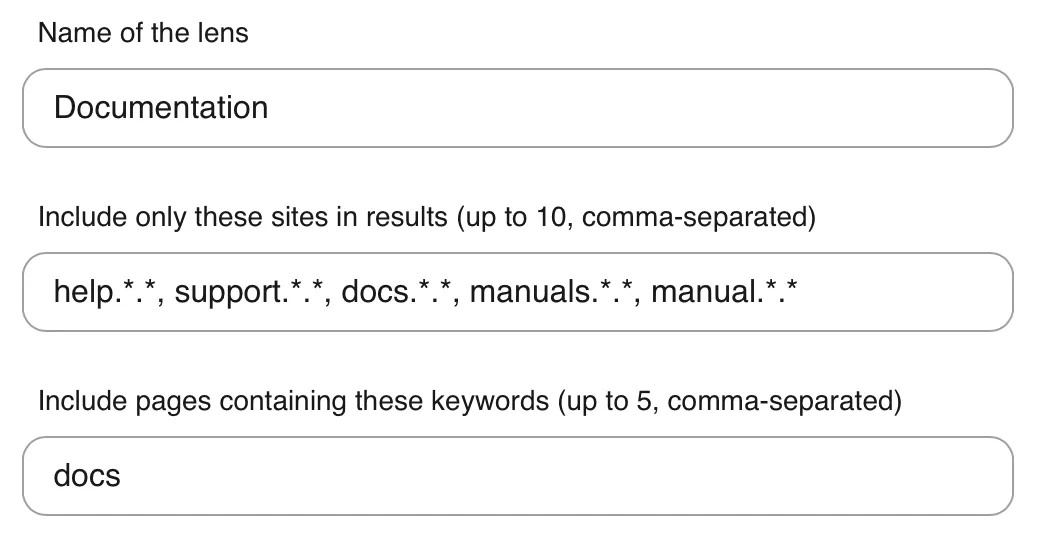
You might’ve noticed that the previous query triggered the lens with a bang. You might now be wondering whether DDG’s bangs work on Kagi and the answer is yes. On top of DuckDuckGo’s extensive bang library, Kagi lets you create your own bangs that would probably not be added to the general DDG library for lack of their popularity (I’ve tried requesting some and they never added them). I have one custom bang that searches my university library’s archive and another that queries their class database. And since I hate American defaultism, I created a “!kindle” bang that searches the Amazon.de Kindle store instead of using the default “!kindlede” bang to do the same. It was mostly to see if my bangs take precedence over Kagi’s and it turns out they do.
In the same spirit, you can modify URLs in your search results. Frequently when I search for an item when I’m still unsure what I’m looking for to pass it onto more specialized sites, I use a general-purpose search engine (like Kagi in this instance). With DuckDuckGo and Kagi (by default), they don’t show me localized websites like Amazon.de instead of Amazon.com for example. That can be alleviated with this Regex redirect rule: ^https://www.amazon.com|https://www.amazon.de. I apply the same rule for eBay and Reddit (replacing redditmedia.com with reddit.com) because I was getting those (broken) “redditmedia” links in my results for some reason.
All of these changes are of the “set-and-forget” type. I configured them when I started using the service months ago as I was going through every settings page. These features alone would’ve left me unconvinced to dish out 11€ a month2, though, until I learned that Kagi shipped with a translation, proofreading and dictionary service within the same subscription which I hadn’t known about since they don’t advertise them on their website. I was getting very frustrated with DeepL’s constant nagging for me to pay up and use their AI features that I didn’t ask for. Indeed, I wanted better and more customized translation and especially a proofreader for my assignments that wasn’t ChatGPT or Grammarly, but DeepL’s pricing was too high for my liking. If I can get all those search features along with a unified dictionary (replacing Duden and Merriam-Webster), translation and proofreader interface, it’s kind of worth it.
I gave Kagi a shot after receiving a three-month free trial as an Ente user as part of their “Friends” initiative, so this month was my first month paying for their service. The hundred free searches they normally give away were not sufficient to convince me of their product. Quite frankly, I’m still uncomfortable contributing to a project that was started as an AI company and heavily integrates LLMs in their product, their CEO’s behavior notwithstanding. So I hope something comparable on grounds of its features comes around with a privacy policy that isn’t based on pinky promises only.
The TLD ranking is undocumented, but it works.↩
Conversion plus taxes plus international payment fee because I have a student bank account.↩